


SQL Server Extened Events provide a light weight mechanism for tracking and monitoring various things in SQL Server. In this post, I am going to show you how to track the login activity using Extended Events. The example provided in this post will show you various things like:
- Who is connecting to your SQL Server
- When did they connect (first and last login times)
- How many times each of those logins have connected to your SQL Server
- Which application is making that connection
- Which host is making those connections
- Are your applications using connecting pooling or not to connect to your SQL Server
- Frequency of logins per minute and per hour
How does it work?
The idea is simple:
- A stored procedure named dbo.XE_CaptureLoginStats sets up the Extended Events session
- The Extended Events session tracks the sqlserver.login event
- It extracts the data from the output .XEL file using the XML XQuery and saves the data into a table dbo.LoginStats
- IMPORTANT: Schedule this stored procedure to run every hour using an SQL Server Agent job
- Simply query the dbo.LoginStats table to look at the data collected
NOTE: its OK to schedile the stored procedure dbo.XE_CaptureLoginStats to run less frequently, say every 4 hours. But on a busy SQL Server, with lots of login activity, its best to run it at least once every hour, so that the output .XEL files are cleared down every hour, before they get too big. When the .XEL files get too big, it takes longer to process the XML data, as well as higher CPU utilisation.
Code and deployment instructions
Create the stored procedure dbo.XE_CaptureLoginStats by running the below code into a database of your choice – typically a DBA tools database. This stored procedure always checks for the existence of the output table dbo.LoginStats and creates it if its not already there. No need to run the table creation script manually.
IF OBJECT_ID('dbo.XE_CaptureLoginStats', 'P') IS NOT NULL
BEGIN
	RAISERROR('Stored procedure dbo.XE_CaptureLoginStats already exists. Dropping and recreating', 0, 1)
	DROP PROC dbo.XE_CaptureLoginStats
END
GO

CREATE PROC dbo.XE_CaptureLoginStats
(
	@XESessionName sysname = 'XE_LoginStats',
	@XELFilePath nvarchar(1024) = '',
	@RecreateLoginStatsTable bit = 0
)
AS
BEGIN
	-- Created by Vyas Kondreddi
	-- https://dutyDBA.com/
	SET NOCOUNT ON

	DECLARE @XECMD nvarchar(4000), @XELFileWild nvarchar(512), @RetVal int, @XELFile nvarchar(1024)

	IF @XESessionName IS NULL OR LTRIM(RTRIM(@XESessionName)) = ''
	BEGIN
		RAISERROR('Invalid Extended Events session name provided. Defaulting to XE_LoginStats', 0, 1)
		SET @XESessionName = 'XE_LoginStats'
	END

	IF OBJECT_ID('dbo.LoginStats', 'U') IS NULL OR @RecreateLoginStatsTable = 1
	BEGIN
		IF OBJECT_ID('dbo.LoginStats', 'U') IS NULL
		BEGIN
			RAISERROR('The output table dbo.LoginStats is not found. Creating it', 0, 1)
		END

		IF @RecreateLoginStatsTable = 1 AND (OBJECT_ID('dbo.LoginStats', 'U') IS NOT NULL)
		BEGIN
			RAISERROR('Recreating the output table dbo.LoginStats', 0, 1)
			SET @XECMD = 'DROP TABLE dbo.LoginStats'
			RAISERROR('%s', 0, 1, @XECMD)
			EXEC sp_executesql @XECMD
		END

		SET @XECMD =
	'
		CREATE TABLE dbo.LoginStats
		(
			LoginName sysname NOT NULL,
			ClientHostName sysname NOT NULL,
			ApplicationName sysname NOT NULL,
			TotalLogins bigint NOT NULL,
			PooledConnections bigint NOT NULL,
			NonPooledConnections bigint NOT NULL,
			LoginsPerMinute AS (TotalLogins/NULLIF(DATEDIFF(mi, FirstLoginUTC, LastLoginUTC), 0)),
			LoginsPerHour AS (TotalLogins/NULLIF(DATEDIFF(hh, FirstLoginUTC, LastLoginUTC), 0)),
			FirstLoginUTC datetime2 NOT NULL,
			LastLoginUTC datetime2 NOT NULL
		);
		ALTER TABLE dbo.LoginStats ADD CONSTRAINT PK_LoginStats PRIMARY KEY (LoginName, ClientHostName, ApplicationName)

	'
		RAISERROR('%s', 0, 1, @XECMD)
		EXEC sp_executesql @XECMD
	END

	SET @XELFile =
	(
		SELECT
			CAST(esf.value AS nvarchar(512))
		FROM
			sys.server_event_sessions  AS es
			JOIN
			sys.server_event_session_fields AS esf
			ON es.event_session_id = esf.event_session_id
			AND esf.name = 'filename'
		WHERE
			es.name = @XESessionName
	)

	IF @XELFile IS NOT NULL
	BEGIN
		RAISERROR('Extended Events session %s already exists. Processing the data', 0, 1, @XESessionName)
		SET @XELFileWild = REPLACE(@XELFile, '.xel', '*.xel');

		WITH XECTE (LoginTime, LoginName, ClientHostName, ApplicationName, is_Cached) AS
		(
			SELECT
				event_data.value('(event/@timestamp)[1]', 'datetime2') AS LoginTime,
				event_data.value('(event/action[@name="server_principal_name"]/value)[1]', 'sysname') AS LoginName,
				event_data.value('(event/action[@name="client_hostname"]/value)[1]', 'sysname') AS ClientHostName,
				event_data.value('(event/action[@name="client_app_name"]/value)[1]', 'sysname') AS ApplicationName,
				event_data.value('(event/data[@name="is_cached"]/value)[1]', 'bit') AS is_Cached
			FROM
			(
				SELECT	CAST(event_data AS xml) AS event_data
				FROM	sys.fn_xe_file_target_read_file(@XELFileWild, NULL, NULL, NULL)
			) AS XMLData
		)
		MERGE dbo.LoginStats AS tgt
		USING
		(
		SELECT
			LoginName,
			COALESCE(ClientHostName, 'UNKNOWN') AS ClientHostName,
			COALESCE(ApplicationName, 'UNKNOWN') AS ApplicationName,
			MIN(LoginTime) AS FirstLoginUTC,
			MAX(LoginTime) AS LastLoginUTC,
			COUNT(*) AS TotalLogins,
			SUM(CASE WHEN is_Cached = 1 THEN 1 ELSE 0 END) AS PooledConnections,
			SUM(CASE WHEN is_Cached = 0 THEN 1 ELSE 0 END) AS NonPooledConnections
		FROM XECTE
		GROUP BY LoginName, ClientHostName, ApplicationName
		) AS src
		ON src.LoginName = tgt.LoginName AND src.ClientHostName = tgt.ClientHostName AND src.ApplicationName = tgt.ApplicationName
		WHEN MATCHED
			THEN
				UPDATE
				SET
					tgt.LastLoginUTC = src.LastLoginUTC,
					tgt.TotalLogins += src.TotalLogins,
					tgt.PooledConnections += src.PooledConnections,
					tgt.NonPooledConnections += src.NonPooledConnections
		WHEN NOT MATCHED
			THEN
				INSERT (LoginName, ClientHostName, ApplicationName, FirstLoginUTC, LastLoginUTC, TotalLogins, PooledConnections, NonPooledConnections)
				VALUES (src.LoginName, src.ClientHostName, src.ApplicationName, src.FirstLoginUTC, src.LastLoginUTC, src.TotalLogins, src.PooledConnections, src.NonPooledConnections);
	END
	ELSE
	BEGIN
		RAISERROR('Extended Events session %s Not found', 0, 1, @XESessionName)
	END

	IF EXISTS(SELECT 1 FROM sys.dm_xe_sessions WHERE name = @XESessionName)
	BEGIN
		--Stop the session
		RAISERROR('Stopping the currently running session %s', 0, 1, @XESessionName)
		SET @XECMD = 'ALTER EVENT SESSION ' + QUOTENAME(@XESessionName) + ' ON SERVER STATE = STOP'
		EXEC sp_executesql @XECMD
	END
	ELSE
	BEGIN
		RAISERROR('Extended Events session %s is not currently running', 0, 1, @XESessionName)
	END

	IF @XELFile IS NOT NULL
	BEGIN
		SET @XECMD = 'del ' + QUOTENAME(@XELFileWild, '"')
		RAISERROR('Deleting session output files: %s', 0, 1, @XECMD)
		EXEC @RetVal = xp_cmdshell @XECMD, NO_OUTPUT
		IF @RetVal = 1 RAISERROR('Error occured while deleting session output files: %s. Clean up manually', 0, 1, @XECMD)
	END

	IF EXISTS (SELECT 1 FROM sys.server_event_sessions WHERE name = @XESessionName)
	BEGIN
		RAISERROR('Dropping extended events session: %s', 0, 1, @XESessionName)
		SET @XECMD = 'DROP EVENT SESSION ' + @XESessionName + ' ON SERVER'
		EXEC sp_executesql @XECMD
	END

	SET @XELFilePath = COALESCE(@XELFilePath, '')
	SET @XELFilePath = NULLIF(LTRIM(RTRIM(@XELFilePath)), '')
	IF RIGHT(@XELFilePath, 1) <> '\' SET @XELFilePath += '\'

	IF @XELFilePath IS NOT NULL
	BEGIN
		SET @XELFile = @XELFilePath + @XESessionName + '.xel'
	END
	ELSE
	BEGIN
		SET @XELFilePath = REPLACE(CAST(SERVERPROPERTY('ErrorLogFileName') AS nvarchar(512)), '\ERRORLOG', '') + '\'
		SET @XELFile = @XELFilePath + @XESessionName + '.xel'
	END

	RAISERROR('Output file for Extended Events Session %s is set to %s', 0, 1, @XESessionName, @XELFile)

	SET @XECMD =
	'
	CREATE EVENT SESSION ' + QUOTENAME(@XESessionName) + ' ON SERVER
	ADD EVENT sqlserver.login
	(
		ACTION
		(
			sqlserver.server_principal_name,
			sqlserver.client_hostname,
			sqlserver.client_app_name
		)
	)
	ADD TARGET package0.event_file(SET filename=N''' + @XELFile + ''',max_file_size=(100))
	WITH (MAX_MEMORY=4096 KB,EVENT_RETENTION_MODE=ALLOW_SINGLE_EVENT_LOSS,MAX_DISPATCH_LATENCY=30 SECONDS,MAX_EVENT_SIZE=0 KB,MEMORY_PARTITION_MODE=NONE,TRACK_CAUSALITY=OFF,STARTUP_STATE=ON)

	'
	RAISERROR('Creating Extended Events Session %s', 0, 1, @XESessionName)
	RAISERROR('%s', 0, 1, @XECMD)
	EXEC sp_executesql @XECMD

	RAISERROR('Startting extended events session: %s', 0, 1, @XESessionName)
	SET @XECMD = 'ALTER EVENT SESSION ' + QUOTENAME(@XESessionName) + ' ON SERVER STATE = START'
	EXEC sp_executesql @XECMD
END
GO

IF OBJECT_ID('dbo.XE_CaptureLoginStats', 'P') IS NOT NULL
BEGIN
	RAISERROR('Stored procedure dbo.XE_CaptureLoginStats created successfully', 0, 1)
ENDInput parameters for dbo.XE_CaptureLoginStats
| @XESessionName – Optional Specifies the name of the Extended Events session. If not specified, the Extended Events session name default sto XE_LoginStats The output .XEL file inherits its name from the specified Extended Events session name |
| @XELFilePath – Optional Specifies the path for storing the output .XEL file If not specified, the .XEL path defaults to the SQL Server error log folder |
| @RecreateLoginStatsTable – Optional Specifies if the output table dbo.LoginStats needs to be recreated. Defaults to 0 – meaning new data gets added to the existing table dbo.LoginStats If set to 1, the table dbo.LoginStats gets recreated. You may use this parameter as a one off to reset the data |
Here’s how to run the stored procedure. You can just run it with no input parameters at all. You can also use some or all of the input parameters as shown in the below example. Remember, you need to schedule this stored procedure call to run every hour using an SQL Agent job, or any other scheduling tool of your choice like Windows Task Scheduler, Autosys etc.
--Example 1:
--Run the stored procedure with no input parameters
EXEC dbo.XE_CaptureLoginStats


--Example 2:
--Run the stored procedure by specifying a new extended event name
EXEC dbo.XE_CaptureLoginStats
	@XESessionName = 'XE_LoginStats_June2026'


--Example 3:
--Run the stored procedure to specify a new output folder for .XEL files
EXEC dbo.XE_CaptureLoginStats
	@XELFilePath = 'C:\temp\'


--Example 4:
--Specifying a new extended event name and a new non-default output folder
EXEC dbo.XE_CaptureLoginStats
	@XESessionName = 'XE_LoginStats_June2026',
	@XELFilePath = 'C:\temp\'


--Example 5
--Run with default values, but force recreation of the output table dbo.LoginStats
--This gets rid of old data in the output table dbo.LoginStats
EXEC dbo.XE_CaptureLoginStats
@RecreateLoginStatsTable = 1Let’s look at the output
Provided you are running the above stored procedure at regular intervals via a job, the data keeps getting accumulated into the dbo.LoginStats table. You simply need to query the table to see the output. Here’s an example query:
SELECT *
FROM dbo.LoginStats
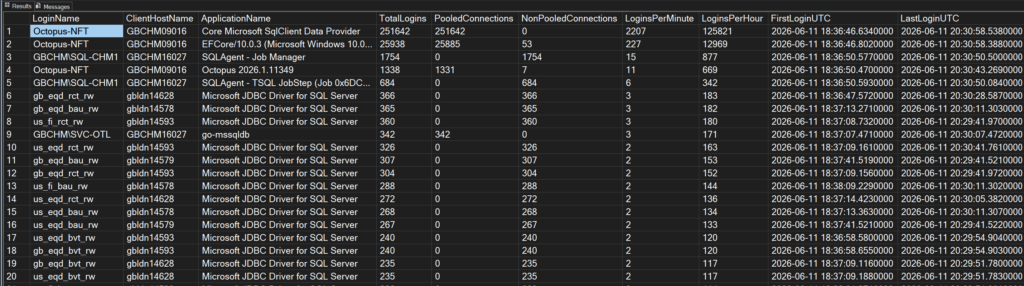
ORDER BY TotalLogins DESCHere’s a screenshot of the output from a server that is running this evetend event based solution:
What can you learn from the output and what actions can you take?
Here’s a quick list of things you can learn by looking at the output, and the actions you can take
First of all, you can see a list of all the logins that connect to your SQL Server, along with when the first connected, when they last connected, how many times that login connected successfully in total, which hosts/servers, and applications are using that login to connect to your SQL Server. The output also tells you, on average, how many times each login is connecting per minute and per hour. This gives you a fairly good overview of what are your busiest applications that login more frequently.
In the above output screenshot, you will notice that the login Octopus-NFT is logging in over 2,200 times per minute and as per the TotalLogins column, it has logged in over 250,000 times so far. As a DBA, you have to question this. Is this excessive logging? Is it really necessary? Is the application doing aggressive polling, which can be avoided by employing a different caching technique?
Fortunately in this case, as per the PooledConnections and NonPooledConnections columns, all connections by this login are from a connection pool – meaning the application is reusing connections from the connection pool, that have already authenticated, rather than going through full authentication process everytime.
Another thing I find useful in the output is the ApplicationName column. Some developers don’t bother with identifying the application properly by specifying an application name in the connection string – in this case, the .net or PowerShell applications simply show up as .net sqlclient data provider. This is not helpful, when a DBA is trying to understand who is doing what on the server, during troubleshooting. Using this output, you can go after those developers and ask them to update their apps to report the correct application name.
Similarly, using the PooledConnections and NonPooledConnections columns, you can identify if an application is using connection pooling or not. Sometimes an application update or a erroneous configuration change can break connection pooling. The issue can be quickly confirmed and fixed, by looking at this data.
Last but not least, this scenario is quite common: An application is being decommissioned – once the application is fully shutdown, the corresponding database can also be decommisioned. Before dropping the database, you want to be sure that application and its associated login is no longer connecting to your SQL Server. Using the LastLoginUTC column, you can tell when the application last connected to your SQL Server.
I’m sure there can be other scenarios where this can be helpful. Please share your thoughts and ideas by leaving a comment below.
