


Some non-production environments require copies of latest production databases for live testing, bug fixing and new code deployments. These environments have a current production database copy, as well as T-1, T-2 database copies that are copies of prodciton databases from 1 day and 2 days ago for example. For such environments, it is important that the respecitve databases have been restored using production backups from correct dates or correct points in time.
Some times you as a DBA might want to quickly check when each of your non-production databases have been last restored on your development SQL Server.
Your development manager might ask you for a report of all the databases on the development SQL Server along with the last restored date of each database.
All the above requirements and questions can be easily addressed by querying the backup and restore history tables from the msdb database on your SQL Server. In this post, I am going to provide you with a T-SQL script that answers all the restore related questions by querying the restorehistory and backupset tables from msdb database.
Note: This query relies on the history table restorehistory from msdb database. You may not see an entry for your database in the output, If your database has been restored a long time ago, and the entries from restorehistory have since been purged,
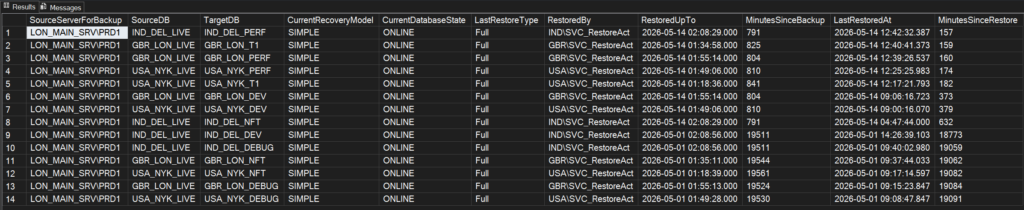
The below table describes the list of columns returned by the T-SQL code
| Output colum name | Description |
|---|---|
| SourceServerForBackup | Name of the SQL Server where the backup file originated from |
| SourceDB | Name of the source database that has been backed up |
| TargetDB | Name of the target database that has been restored |
| CurrentRecoveryModel | Current database recovery model of the restored database |
| CurrentDatabaseState | Current state of the restored database (eg. ONLINE, OFFLINE, RESTORING etc.) |
| LastRestoreType | Shows you whether the last restore was a FULL backup, transaction log or differential restore |
| RestoredBy | Name of the login that executed the RESTORE command |
| RestoredUpTo | Backup completion timestamp. If you’d used STOPAT option of the restore, this would show the point to whcih the database has been restored to |
| MinutesSinceBackup | Mminutes elapsed since the completion of the BACKUP date |
| LastRestoredAt | Restore completion date |
| MinutesSinceRestore | Minutes elapsed since the competion of the RESTORE operation |
Here’s the code to get the RESTORE history report. You should be able to run this code on any server, without changing the code and if you are feeling creative, you can easily create a dashboard based on this output.
-- Script created by Vyas Kondreddi
-- https://dutyDBA.com

SELECT
    bkpst.server_name AS SourceServerForBackup,
    bkpst.[database_name] AS SourceDB,
    rh.destination_database_name AS TargetDB,
	  DATABASEPROPERTYEX(rh.destination_database_name, 'Recovery') AS CurrentRecoveryModel,
    DATABASEPROPERTYEX(rh.destination_database_name, 'Status') AS CurrentDatabaseState,
    CASE COALESCE(bkpst.[type], ' ')
        WHEN 'D' THEN 'Full'
        WHEN 'I' THEN 'Differential'
        WHEN 'L' THEN 'Log'
        WHEN 'F' THEN 'File/Filegroup'
        WHEN 'G' THEN 'Differential File'
        WHEN 'P' THEN 'Partial'
        WHEN 'Q' THEN 'Differential Partial'
    END AS LastRestoreType,
	  rh.[user_name] AS RestoredBy,
	  COALESCE(rh.stop_at, bkpst.backup_finish_date) AS RestoredUpTo,
	  DATEDIFF(mi, bkpst.backup_finish_date, CURRENT_TIMESTAMP) AS     MinutesSinceBackup,
    rh.restore_date AS LastRestoredAt,
    DATEDIFF(mi, rh.restore_date, CURRENT_TIMESTAMP) AS MinutesSinceRestore
FROM
	msdb..backupset bkpst
	JOIN
	msdb..restorehistory rh
	ON	bkpst.backup_set_id = rh.backup_set_id
	JOIN
	(
		SELECT
			rh_1.destination_database_name,
			MAX(rh_1.restore_date) restore_date
		FROM
			msdb..restorehistory AS rh_1
		GROUP BY
			rh_1.destination_database_name
	) AS rh2
	ON
		rh2.restore_date = rh.restore_date
		AND rh2.destination_database_name = rh.destination_database_name
ORDER BY
	rh.restore_date DESC
GOSample output:
Hope you find this code useful. As usual, feel free to share your thoughts by leaving a comment below!
See Also:
How to monitor all the currently running SQL Server Backup and Restore operations in real time?
How to find the last backup date of every database on your SQL Server?
