


Have you ever had the need to run a script across multiple SQL Server instances? Its a common requirement in larger estates with thousands of SQL Server instances. Some of the following scenarios require a tool that can run a script on a specified list of SQL Servers.
Scenario 1: As the poduction DBA, you are asked to produce a list of all sysadmin server role members across your 1000+ strong SQL Server estate. This is an urgent requirement as part of an external audit.
Scenario 2: You have made a change to one of the standard DBA jobs (like a backup job). Now, you need to rollout this change to all your SQL Servers that run this job.
Scenario 3: One of your production SQL Servers has experienced an issue. You have identified that the issue is related to an sp_configure setting and have resolved the issue. You know that a lot of other production SQL Server instances in your estate use the same problematic setting. Now you need to rollout the fix to the rest of your prodction servers.
How do you go about deploying/executing scripts across your SQL Servers in the above scenarios?
There are a few options available – like the Central Management Server (CMS) feature of SQL Server, that let’s you run queries against a group of servers registered in your SQL Server Management Studio. There’s also the multi-server SQL Agent jobs option, that can target mul;tiple servers. DBAs also address this requirement by running sqlcmd.exe from command line, inside a loop. However, all these options lack flexibility, logging, scalability on large estates. Its also not ideal to register hundreds of servers and manage them all within SQL Server Management Studio.
The other option is to fork out some cash for a third party product.
Having tried some of the above optoins, I have decided to create my own script deployment tool using PowerShell. I am calling it SQLScriptRunner.
I am going to share the complete PowerShell code for SQLScriptRunner in this post. This post has the following sections:
How does SQLScriptRunner work?
Here’s a brief overview of how SQLScriptRunner works.
- Its a tool written in PowerShell
- It can get a list of target SQL Server & database names from a specified flat file
- It can also get target SQL Server & database names by querying a specified table from an SQL Server
- It reads the query or script that needs to be executed, from a specified text file
- Then it loops through the list of target servers and databases, and executes that query/script
- It saves the output of the query from all the target servers to a single output file in .CSV format
- You can review the output /CSV file or use the output to create reports in Excel spreadsheets
- During the execution, it displays the real time status of what its doing, on the screen
- It also creates a log file, documenting all the steps it has performed, along with timestamps
What are the input parameters of SQLScriptRunner?
| $ServerListLocation Defaults to the value “FILE” – indicating the target server & database list is stored in a text file. If you specify an SQL Server name instead as input, the script will get the server & database names by querying that SQL Server. |
| $Delimiter Defaults to a delimiter value of # (hash). This is the delimiter that separates the SQL Server and database names in the text file that stores the target SQL Server and database names. You are free to use other delimiters like comma, colon etc. |
| $ServerList_Or_Query If the first parameter $ServerListLocation is set to “FILE”, then specify a file name as input to $ServerList_Or_Query. This file should contain the target SQL Server and database names as shown below: SQLServerName1#DatabaseName1 SQLServerName1#DatabaseName2 SQLServerName2#DatabaseName25 SQLServerName3#MyDatabase1 If an SQL Server name is specified as input to the first parameter $ServerListLocation, then specify a file name as input to $ServerList_Or_Query. This file should contain the SQL query to be executed on the server, to get a list of SQL Server and database names. The query should return SQL Server name as the first column and database name as the second column. If a database name is not included in the query, SQLScriptRunner will default to master database. |
| $QueryFile Name of the file containing the SQL query or command that you want to execute on each of the target SQL Server and database name combination. You can control the database context by using the USE statement in your script. |
| $OutputFile Name of the CSV file into which the output of the query (contained in the $QueryFile parameter) is to be stored. This script will store the output from each server and database name combination into this file. Its a .CSV file and can be opened in Notepad or Excel for better readability. If the query doesn’t retun any rows, then this file will be empty. |
| $ErrorLogFile Name of the file into which all the status information, debug information, and error messages are written to. If no value is specified, the script will ceate a log file with the same name as $OutputFile, but adds a .log extension to it. |
| $ConnectionTimeout This is the connection timeout value in Seconds. It defaults to 5 seconds. This is the amount of time the script will wait to establish connection to the target SQL Servers, before timing out. |
How to run SQLScriptRunner?
You only need to save the SQLScriptRunner.PS1 script on your personal computer – not on your SQL Server hosts. Just save it your computer that has access to your SQL Servers.
My recommendation would be to download and save the PowerShell script file SQLScriptRunner.PS1 into a folder of your choice – like C:\SQLScriptRunner.
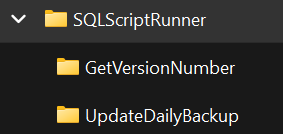
Then create sub folders under the above folder, for each of your tasks. For example, if you want to gather the full version number of all of your SQL Server instances, create a sub folder named GetVersionNumber, and store your server lists, query files, output files in this subfolder.
Similarly, if you are trying to update your daily backup stored procedure on all your SQL Servers, create a subfolder named UpdateDailyBackup to store everything you need for this task. Your directory structure should look something like this:
Example 1: To run a script on servers, where the target server names are provided in a text file
To get the full version number from multiple SQL Server instances on your estate, here are the steps:
You need to create the below two files under the GetVersionNubmber folder:
- ServerList.txt – this stores the list of SQL Server names, one per each line
- Query.txt – this stores the query to get the full version number from each of the target SQL Servers
SELECT @@SERVERNAME AS ServerName, SERVERPROPERTY('ProductVersion') AS VersionNumber
Open a command prompt window (cmd.exe), and switch to the folder/directory where you’ve saved the SQLScriptRunner.PS1 file. Run the below command:
PowerShell.exe -F SQLScriptRunner.ps1 -ServerListLocation "File" -ServerList_Or_Query "GetVersionNumber\ServerList.txt" -QueryFile "GetVersionNumber\Query.txt" -OutputFile "GetVersionNumber\Output.csv"
The on screen output would look like below. Same information would be written to the log fiile (in the same folder as the outoput file)
C:\SQLScriptRunner>PowerShell.exe -F SQLScriptRunner.ps1 -ServerListLocation "File" -ServerList_Or_Query "GetVersionNumber\ServerList.txt" -QueryFile "GetVersionNumber\Query.txt" -OutputFile "GetVersionNumber\Output.csv"
INFO: SQLScriptRunner execution starting
INFO: Input Parameters
        ServerListLocation: File
        Delimiter: #
        ServerList_Or_Query: GetVersionNumber\ServerList.txt
        QueryFile: GetVersionNumber\Query.txt
        OutputFile: GetVersionNumber\Output.csv
        ErrorLogFile: GetVersionNumber\Output.csv.log
        ConnectionTimeout: 5
INFO: Deleting output file GetVersionNumber\Output.csv if already exists and recreating
INFO: Reading the SQL Query from GetVersionNumber\Query.txt
INFO: Reading the list of servers from GetVersionNumber\ServerList.txt
INFO: 4 server(s) returned
INFO: (1 of 4) - Connecting to server: (local)\SQL2025 and executing the query on database master
INFO: Done. 1 row(s) returned
INFO: (2 of 4) - Connecting to server: (local),49226 and executing the query on database master
INFO: Done. 1 row(s) returned
INFO: (3 of 4) - Connecting to server: CHMMSSLP7S1 and executing the query on database master
INFO: Done. 1 row(s) returned
INFO: (4 of 4) - Connecting to server: CHMMSSLP7S2 and executing the query on database master
INFO: Done. 1 row(s) returned
INFO: Output saved to GetVersionNumber\Output.csv
INFO: SQLScriptRunner execution completed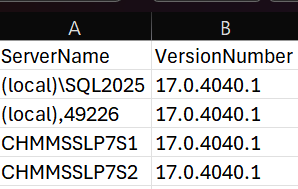
Example 2: To run a script on servers, where the target server names are queried from a database table
In this example, I’ll show you how to get the target server list dynamically by querying a table that stores the server names. See how the parameters have been changed to allow the script to get the server names from a table. The ServerListLocation parameter has been changed from FILE, to the name of an SQL Server. The ServerList_Or_Query parameter points to a file ServerList.txt – this file should be updated to contain an SQL query that returns a list of SQL Servers, rather than a hard-coded server list – as in:
SELECT ServerName FROM MySQLInventory.dbo.MySQLServers ORDER BY ServerNamePowerShell.exe -F SQLScriptRunner.ps1 -ServerListLocation "CHMMSSLP7S2" -ServerList_Or_Query "GetVersionNumber\ServerList.txt" -QueryFile "GetVersionNumber\Query.txt" -OutputFile "GetVersionNumber\Output.csv"
When the above command is executed, you will get the same output as Example 1, but in this case, the list of target servers has been dynamically retrieved by querying a table. Most DBAs have some sort of SQL Server inventory database that stores a list of their SQL Servers and databaes. You could easily point SQLScriptRunner to such an inventory database to target your SQL Servers dynamically.
Complete PowerShell code for SQLScriptRunner:
<#

    SQLScriptRunner
    Created by Vyas Kondreddi
    https://dutyDBA.com

#>

# Input parameters for SQLScriptRunner
param
(
    [string]$ServerListLocation = "File",
    [string]$Delimiter = "#",
    [string]$ServerList_Or_Query,
    [string]$QueryFile,
    [string]$OutputFile,
    [string]$ErrorLogFile,
    [int]$ConnectionTimeout = 5
)


# Function for writing status messages to log file
function Write-LogFileEntry
{
    param
    (
        [string]$Message,
        [string]$ErrorLogFile,
        [string]$MsgType = "I"
    )

    if($MsgType -eq "E")
    {
        Write-Host $Message -foregroundcolor yellow
    }
    else
    {
        Write-Host $Message -foregroundcolor white
    }
    $line = "$(Get-Date -Format "yyyy-MM-dd HH:mm:ss") - " + $Message
    Add-Content -Path $ErrorLogFile -Value $line
}


# Function for executing the specified SQL query on target server
function Run-Query
{
    param
    (
        [string]$ServerName,
        [string]$DatabaseName,
        [string]$TargetSqlQuery,
        [string]$OutputFile,
        [string]$ErrorLogFile,
        [int]$ConnectionTimeout = 5,
        [int]$ServerCTR,
        [int]$ServerCTR2
    )

    if ($DatabaseName.Trim() -eq "")
    {
        $DatabaseName = "master"
    }

    $Message = "INFO: (" + $ServerCTR2 + " of " + $ServerCTR + ") - Connecting to server: " + $ServerName + " and executing the query on database " + $DatabaseName
    Write-LogFileEntry -Message $Message -ErrorLogFile $ErrorLogFile -MsgType "I"
    $TargetSqlConnection = New-Object System.Data.SqlClient.SqlConnection
    $TargetSqlConnection.ConnectionString = "Server = " + $ServerName + "; Database = " + $DatabaseName + "; Integrated Security = True; Application Name = SQLScriptRunner" + ";Connection Timeout = " + $ConnectionTimeout
    $TargetSqlCmd = New-Object System.Data.SqlClient.SqlCommand
    $TargetSqlCmd.CommandText = $TargetSqlQuery
    $TargetSqlCmd.Connection = $TargetSqlConnection

    $TargetSqlAdapter = New-Object System.Data.SqlClient.SqlDataAdapter
    $TargetSqlAdapter.SelectCommand = $TargetSqlCmd


    $TargetDataSet = New-Object System.Data.DataSet
    try
    {
        $RCtr = $TargetSqlAdapter.Fill($TargetDataSet)
        $TargetSqlConnection.Close()
        $TargetData = $TargetDataSet.Tables[0]
        If ($TargetData)
        {
            $TargetDataSet.Tables[0] | Export-Csv $OutputFile -NoTypeInformation -Append
        }
        $Message = "INFO: Done. " + $TargetDataSet.Tables[0].Rows.Count + " row(s) returned"
        Write-LogFileEntry -Message $Message -ErrorLogFile $ErrorLogFile -MsgType "I"
    }
    catch
    {
        $Message = "ERROR: Failed to connect to server " + $ServerName + " or failed to execute the query"
        Write-LogFileEntry -Message $Message -ErrorLogFile $ErrorLogFile -MsgType "E"
        $Message = "ERROR: ***" + $_.Exception.Message + "***"
        Write-LogFileEntry -Message $Message -ErrorLogFile $ErrorLogFile -MsgType "E"
    }


}


# Script Start

if (-not $ErrorLogFile)
{
    $ErrorLogFile = $OutputFile + ".log"
}

try
{
   $line = "$(Get-Date -Format "yyyy-MM-dd HH:mm:ss") - INFO: SQLScriptRunner execution starting"
   Write-Host "INFO: SQLScriptRunner execution starting" -foregroundcolor white
   Set-Content -Path $ErrorLogFile -Value $line -ErrorAction Stop
}
catch
{
    Write-Host "ERROR: Unable to create error log file $ErrorLogFile" -foregroundcolor yellow #-backgroundcolor red
    Write-Host "***" $_.Exception.Message "***" -foregroundcolor yellow #-backgroundcolor red
    Return
}

Write-LogFileEntry -Message "INFO: Input Parameters" -ErrorLogFile $ErrorLogFile -MsgType "I"
$Message = "`tServerListLocation: $ServerListLocation"
Write-LogFileEntry -Message $Message -ErrorLogFile $ErrorLogFile -MsgType "I"
$Message = "`tDelimiter: $Delimiter"
Write-LogFileEntry -Message $Message -ErrorLogFile $ErrorLogFile -MsgType "I"
$Message = "`tServerList_Or_Query: $ServerList_Or_Query"
Write-LogFileEntry -Message $Message -ErrorLogFile $ErrorLogFile -MsgType "I"
$Message = "`tQueryFile: $QueryFile"
Write-LogFileEntry -Message $Message -ErrorLogFile $ErrorLogFile -MsgType "I"
$Message = "`tOutputFile: $OutputFile"
Write-LogFileEntry -Message $Message -ErrorLogFile $ErrorLogFile -MsgType "I"
$Message = "`tErrorLogFile: $ErrorLogFile"
Write-LogFileEntry -Message $Message -ErrorLogFile $ErrorLogFile -MsgType "I"
$Message = "`tConnectionTimeout: $ConnectionTimeout"
Write-LogFileEntry -Message $Message -ErrorLogFile $ErrorLogFile -MsgType "I"


try
{
   $Message = "INFO: Deleting output file $OutputFile if already exists and recreating"
   Write-LogFileEntry -Message $Message -ErrorLogFile $ErrorLogFile -MsgType "I"

   If (Test-Path $OutputFile)
   {
        Remove-Item $OutputFile -ErrorAction Stop
   }
}
catch
{
    $Message = "ERROR: Unable to create new output file $OutputFile. Close it if the file is currently open and retry"
    Write-LogFileEntry -Message $Message -ErrorLogFile $ErrorLogFile -MsgType "E"
    $Message = "ERROR: ***" + $_.Exception.Message + "***"
    Write-LogFileEntry -Message $Message -ErrorLogFile $ErrorLogFile -MsgType "E"
    Return
}


try
{
   $Message = "INFO: Reading the SQL Query from $QueryFile"
   Write-LogFileEntry -Message $Message -ErrorLogFile $ErrorLogFile -MsgType "I"
   If (Test-Path $QueryFile)
   {
        $SQLQuery = Get-Content -Path $QueryFile -Raw
   }
   else
   {
        $Message = "ERROR: Query file " + $QueryFile + " not found"
        Write-LogFileEntry -Message $Message -ErrorLogFile $ErrorLogFile -MsgType "E"
        Return
   }
}
catch
{
    $Message = "ERROR: Unable to read the SQL query from file $QueryFile"
    Write-LogFileEntry -Message $Message -ErrorLogFile $ErrorLogFile -MsgType "E"
    $Message = "ERROR: ***" + $_.Exception.Message + "***"
    Write-LogFileEntry -Message $Message -ErrorLogFile $ErrorLogFile -MsgType "E"
    Return
}


if ($ServerListLocation -eq "File") #Get target server list from a file
{
    $Message = "INFO: Reading the list of servers from $ServerList_Or_Query"
    Write-LogFileEntry -Message $Message -ErrorLogFile $ErrorLogFile -MsgType "I"

    if ($ServerList_Or_Query)
    {
        If (Test-Path $ServerList_Or_Query)
        {
            $ServerCTR = (Get-Content $ServerList_Or_Query | Where-Object { $_.Trim() -ne "" }).Count
            $ServerCTR2 = 1
            $Message = "INFO: " + $ServerCTR + " server(s) returned"
            Write-LogFileEntry -Message $Message -ErrorLogFile $ErrorLogFile -MsgType "I"

            foreach ($ServerName in Get-Content -Path $ServerList_Or_Query)
            {
                if ($ServerName.Trim() -ne "")
                {
                    Run-Query `
                        -ServerName $ServerName.Split($Delimiter)[0] `
                        -DatabaseName $ServerName.Split($Delimiter)[1] `
                        -TargetSqlQuery $SQLQuery `
                        -OutputFile $OutputFile `
                        -ErrorLogFile $ErrorLogFile `
                        -ConnectionTimeout $ConnectionTimeout `
                        -ServerCTR $ServerCTR `
                        -ServerCTR2 $ServerCTR2
                    $ServerCTR2 += 1
                }
            }
        }
        else
        {
            $Message = "ERROR: File $ServerList_Or_Query does not exist"
            Write-LogFileEntry -Message $Message -ErrorLogFile $ErrorLogFile -MsgType "E"
            return
        }
    }
    else
    {
        $Message = "ERROR: The parameter ServerList_Or_Query is not provided"
        Write-LogFileEntry -Message $Message -ErrorLogFile $ErrorLogFile -MsgType "E"
        return
    }
}
else #Get target server list by querying an SQL Server database
{
    $Message = "INFO: Reading the list of servers by querying $ServerListLocation"
    Write-LogFileEntry -Message $Message -ErrorLogFile $ErrorLogFile -MsgType "I"

    try
    {
       $Message = "INFO: Reading the Server list SQL query from $ServerList_Or_Query"
       Write-LogFileEntry -Message $Message -ErrorLogFile $ErrorLogFile -MsgType "I"
       If (Test-Path $ServerList_Or_Query)
       {
            $ServerListQuery = Get-Content -Path $ServerList_Or_Query -Raw
       }
       else
       {
            $Message = "ERROR: Server list query file " + $ServerList_Or_Query + " not found"
            Write-LogFileEntry -Message $Message -ErrorLogFile $ErrorLogFile -MsgType "E"
            Return
       }
    }
    catch
    {
        $Message = "ERROR: Unable to read the Server list SQL query from file $ServerList_Or_Query"
        Write-LogFileEntry -Message $Message -ErrorLogFile $ErrorLogFile -MsgType "E"
        $Message = "ERROR: ***" + $_.Exception.Message + "***"
        Write-LogFileEntry -Message $Message -ErrorLogFile $ErrorLogFile -MsgType "E"
        Return
    }

    if ($ServerListLocation.Trim() -ne "")
    {
        try
        {
            $SqlConnection = New-Object System.Data.SqlClient.SqlConnection
            $SqlConnection.ConnectionString = "Server = $ServerListLocation; Integrated Security = True; Application Name = SQLScriptRunner"+ ";Connection Timeout = " + $ConnectionTimeout

            $SqlCmd = New-Object System.Data.SqlClient.SqlCommand
            $SqlCmd.CommandText = $ServerListQuery
            $SqlCmd.Connection = $SqlConnection

            $SqlAdapter = New-Object System.Data.SqlClient.SqlDataAdapter
            $SqlAdapter.SelectCommand = $SqlCmd

            $DataSet = New-Object System.Data.DataSet
            $ServerCTR = $SqlAdapter.Fill($DataSet)

            $Message = "INFO: $ServerCTR servers returned"
            Write-LogFileEntry -Message $Message -ErrorLogFile $ErrorLogFile -MsgType "I"
            $SqlConnection.Close()
            $Data = $DataSet.Tables[0]
        }
        catch
        {
            $Message = "ERROR: Failed to connect to server $ServerListLocation or failed to execute the query"
            Write-LogFileEntry -Message $Message -ErrorLogFile $ErrorLogFile -MsgType "E"
            $Message = "***" + $_.Exception.Message + "***"
            Write-LogFileEntry -Message $Message -ErrorLogFile $ErrorLogFile -MsgType "E"
            Return
        }
    }
    else
    {
        $Message = "ERROR: ServerListLocation parameter not provided"
        Write-LogFileEntry -Message $Message -ErrorLogFile $ErrorLogFile -MsgType "E"
        Return
    }

    $ServerCTR2 = 1
    foreach ($Row in $Data)
    {
        Run-Query `
            -ServerName $Row[0] `
            -DatabaseName $Row[1] `
            -TargetSqlQuery $SQLQuery `
            -OutputFile $OutputFile `
            -ErrorLogFile $ErrorLogFile `
            -ConnectionTimeout $ConnectionTimeout `
            -ServerCTR $ServerCTR `
            -ServerCTR2 $ServerCTR2
        $ServerCTR2 += 1
    }
}

If (Test-Path $OutputFile)
{
    $Message = "INFO: Output saved to $OutputFile"
    Write-LogFileEntry -Message $Message -ErrorLogFile $ErrorLogFile -MsgType "I"
}
else
{
    $Message = "INFO: No output returned by any of the target servers"
    Write-LogFileEntry -Message $Message -ErrorLogFile $ErrorLogFile -MsgType "I"
    Set-Content -Path  $OutputFile -Value $Message
}
$Message = "INFO: SQLScriptRunner execution completed"
Write-LogFileEntry -Message $Message -ErrorLogFile $ErrorLogFile -MsgType "I"Useability tips and best practices for SQLScriptRunner
- In the SQL query files provided as input parameter ($QueryFile), do not use GO as batch terminator. GO is a SQL Server Management Studio specific batch terminator and will produce an error. Instead use the semi-colon (;) as batch terminator.
- If you are not specifying the database name as input along with the server name, make sure you specify the correct database context in your query file ($QueryFile parameter), by using the USE statement, or by fully qualifying your table names in the format of DatabaseName.SchemaName.TableName.
- From a security point of view – thoroughly check what is stored in your query file ($QueryFile parameter). Make sure nobody has modified your query file maliciously to cause damage. Restrict access to the folders where you store your SQLScriptRunner setup, so that only the right people have access.
- SQLScriptRunner.PS1 has been created to use Windows integrated security to connect to SQL Servers. This is a security best practice. I have deliberately omitted support for SQL authenticated logins. If you think you need SQL authentication support, let me know by leaving a comment with good justification and I’ll consider a code change 🙂
- If you are planning to use SQLScriptRunner to collect data from various servers into a CSV file for further analysis or reporting, make sure your query returns the SQL Server name as the first column of the output. This way, its always clear which server the data came from – and it also becomes easier to use the Excel filter functionality to pick the data you want.
- SQLScriptRunner executes scripts on one server at a time, in serial order. If you have to run something on a large number of servers, and your script takes a long time to run, its better to parallelise the script execution. To get SQLScriptRunner to deploy/execute scripts in parallel, simply invoke multiple instances of SQLScriptRunner and split your servers into multiple batches. By running multiple instances of SQLScriptRunner, you can achieve the parallelism needed to speed up your deployments.
That’s all for now. Depending on feedback, I will try and update the code as and when time permits. Feel free to leave a comment.
