


Are you looking for a quick way to check all your databases are being backed up successfully, at regular intervals? Then you have come to the right place. As a DBA, it is one of the most important responsibilities of your role. Hopefully, you have monitoring in place for your backup jobs and you get alerted about any failures – but it would be nice to be able to see the status of all types of backups for your most important production servers. I’m not just talking about daily full backups – its important to make sure your transaction log backups are happening too at regular intervals, to prevent any outages resulting from transaction logs getting full.
SQL Server database backup information is stored within the system database msdb – in particular the backupset table. We can obtain the backup status for your databases by joining msdb.dbo.backupset table with sys.databases catalog view.
In this post I am sharing the script from my personal DBA toolbox, that I regularly use, for checking the last backup dates of my databases. This can be a very simple script, but it might look a bit long to you – that’s because I am adding additional value by displaying the backup time, along with a nicely formatted column showong ‘how long has it been since the last backup’. This additional information is shown in the format ’00h 00m 00s’
Note: If you are running this on a replica server that is part of an Always On Availability Group (AG), please make sure you are running this script on the replica that is responsible for running the backups. DBAs often prefer to run backups on the secondary replica instead, to reduce load on the primary replica.
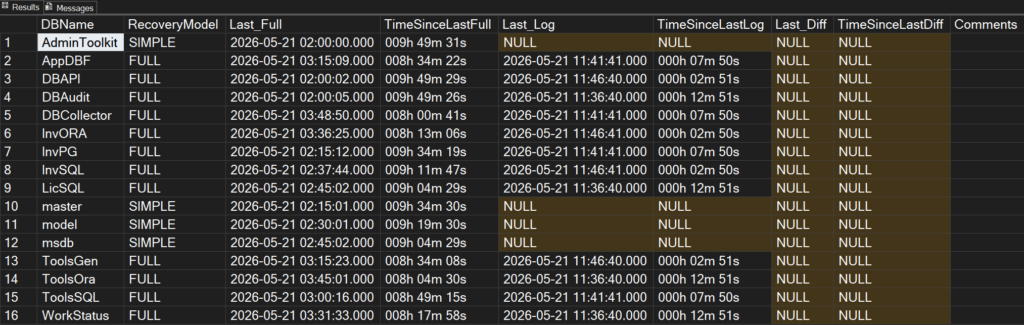
A description of the output columns:
| Column | Description |
|---|---|
| DBName | Name of the database |
| RecoveryModel | Recovery model of your database (like SIMPLE, FULL, BULK_LOGGED) |
| Last_Full | Date and timestamp of the last full backup for this database. NULL if no backup found. |
| TimeSinceLastFull | Shows you how long has it been since the last full backup, in the format 000h 00m 00s |
| Last_Log | Date and timestamp of the last transaction log backup for this database. NULL if no backup found. |
| TimeSinceLastLog | Shows you how long has it been since the last transaction log backup, in the format 000h 00m 00s |
| Last_Diff | Date and timestamp of the last differential (incremental) for this database. NULL if no backup found. |
| TimeSinceLastDiff | Shows you how long has it been since the last differential backup, in the format 000h 00m 00s |
| Comments | If a database is in FULL or BULK_LOGGED recovery model, but without any transaction log backup, then you will see a note about it. Take action to make sure the transaction log doesn’t fill up. |
Here’s the code:
--Written by Vyas Kondreddi
--https://dutyDBA.com

SELECT
    x.DBName,
    x.RecoveryModel,
    x.Last_Full,
    RIGHT('000' + CAST(DATEDIFF(ss, x.Last_Full, CURRENT_TIMESTAMP)/3600 AS varchar(3)), 3) + 'h ' +
    RIGHT('00' + CAST((DATEDIFF(ss, x.Last_Full, CURRENT_TIMESTAMP)%3600)/60 AS varchar(2)), 2) + 'm ' +
    RIGHT('00' + CAST((DATEDIFF(ss, x.Last_Full, CURRENT_TIMESTAMP)%3600)%60 AS varchar(2)), 2) + 's' AS TimeSinceLastFull,
    x.Last_Log,
    RIGHT('000' + CAST(DATEDIFF(ss, x.Last_Log, CURRENT_TIMESTAMP)/3600 AS varchar(3)), 3) + 'h ' +
    RIGHT('00' + CAST((DATEDIFF(ss, x.Last_Log, CURRENT_TIMESTAMP)%3600)/60 AS varchar(2)), 2) + 'm ' +
    RIGHT('00' + CAST((DATEDIFF(ss, x.Last_Log, CURRENT_TIMESTAMP)%3600)%60 AS varchar(2)), 2) + 's' AS TimeSinceLastLog,
    x.Last_Diff,
    RIGHT('000' + CAST(DATEDIFF(ss, x.Last_Diff, CURRENT_TIMESTAMP)/3600 AS varchar(3)), 3) + 'h ' +
    RIGHT('00' + CAST((DATEDIFF(ss, x.Last_Diff, CURRENT_TIMESTAMP)%3600)/60 AS varchar(2)), 2) + 'm ' +
    RIGHT('00' + CAST((DATEDIFF(ss, x.Last_Diff, CURRENT_TIMESTAMP)%3600)%60 AS varchar(2)), 2) + 's' AS TimeSinceLastDiff,

    CASE WHEN (x.RecoveryModel <> 'SIMPLE') AND (x.Last_Log IS NULL)
         THEN 'CHECK: No log backup found'
         ELSE ''
    END AS Comments
FROM
(
    SELECT
        d.name AS DBName,
        MAX(d.recovery_model_desc) AS RecoveryModel,
        MAX(CASE WHEN bst.type = 'D' THEN bst.backup_finish_date END) AS Last_Full,
        MAX(CASE WHEN bst.type = 'L' THEN bst.backup_finish_date END) AS Last_Log,
        MAX(CASE WHEN bst.type = 'I' THEN bst.backup_finish_date END) AS Last_Diff
    FROM
        sys.databases AS d
    LEFT JOIN
    (
        SELECT
            bkp.database_name,
            bkp.type,
            MAX(bkp.backup_finish_date) backup_finish_date
        FROM
            msdb.dbo.backupset AS bkp
        WHERE
            bkp.server_name = @@SERVERNAME
        GROUP BY
            bkp.database_name,
            bkp.type
    ) AS bst
        ON bst.database_name = d.name
    WHERE
        (d.source_database_id IS NULL)
        AND (d.name NOT IN ('tempdb'))
    GROUP BY d.name
) AS x
ORDER BY x.DBName ASCHere’s how the output looks like:
Hope you find this useful. Feel free to share your thoughts by leaving a comment below.
See also:
How to check the last restore date of every database on your SQL Server?
How to monitor all the currently running SQL Server Backup and Restore operations in real time?
