


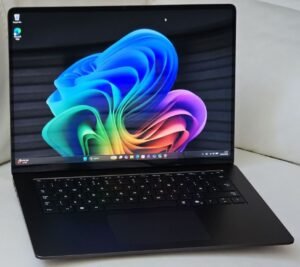
Microsoft’s own Surface range of devices have always been expensive, but they do offer a premium Windows experience. Surface devices offer the best in terms of build quality, premium feel, and of course smooth operation.
I am not a desktop fan – and have never actually owned a desktop PC. All my computers have been laptops so far, except for a one off HP all-in-one computer.
My first three laptops have been from the Sony Vaio range. I felt they were the best for build quality and I really enjoyed using those. Those three laptops combined, have served me as my daily drivers for a total of 18 years. Each of those have lasted six years on average, before they slowed down and needed replacement. Quite impressive. Of course, they were expensive, but they paid for themselves by lasting that long.
By the time my most recent Sony Vaio needed replacing in 2018, Sony have stopped making the Vaio laptops. I was disappointed and was not looking forward to getting used to a different brand laptop. After some careful research, I bought a top end Microsoft Surface Book 2. Its a premium device with a very premium price tag. Its so smooth, and still runs like new after eight years of regular use – but sadly, the battery has died and the laptop can only be used when plugged in. Unfortunately, its quite an intrusive process to replace these batteries and could result in the screen cracking as the batteries are glued to the back of the screen. You have to factor in the inevitable cost of screen replacement too, if you go for a new battery.
I decided to bite the bullet, and go for a new Surface device. Microsoft is no longer making the Surface Book range and I am left with only one choice – Surface Laptop 7 – but there’s always a twist in the plot. I didn’t want the Qualcomm Snapdragon X Plus or Snapdragon X Elite processors or the ARM architecture. That’s mainly due to compatibility issues the ARM architectue has with a lot of the applications I use. I can’t even run SQL Server or Management Studio on the ARM machines.
Fortunately, just in time for me, Microsoft has launched Surface Laptops with Intel processors. These devices are only avialable on the Micrrosoft Business Store, and few other select Business Retailers. It’s a relief to know that individual users are also eligible to buy these devices on the Business Store.
I’ve settled on a black Surface Laptop 7 with 15 inch screen, 32 GB RAM, 1 TB SSD, and Intel Core Ultra 7 processor (Series 2). Its eye-wateringly expensive. I couldn’t find any discount codes or vouchers for Microsoft UK Business Store or any cashback options.
OK, so how to get the discount on these Surface devices then?
I called the customer service number from the Microsoft Business Store to ask if the Silver coloured Surface Laptop is likely to be back in stock. While on the phone, I casually asked if they would offer me a discount. I was pleasantly surprised to hear from a very friendly agent that they could offer me a 7% discount on the Surface Laptop 7, and 10% discount on any accessories and extended warranties. That’s quite a good saving on the advertised price.
It wasn’t a straight forward discount though – first, I had to add the items to my Microsoft Store basket and place the order at full price. Then I had to tell them that I had completed the order online, at which point they processed a refund for the discount amount.
This process didn’t quite go smoothly for me. My basket got stuck, and I could not complete the checkout. The customer service agent couldn’t clear my basket. She had to raise an internal incident ticket, to clear my basked, which took a couple of days. The customer service agent sympathised with the trouble I went trough, and as a good will gesture, increased my discount on the laptop from 7% to 10%! I also ended up buying a Surface USB 4 dock (to connect my 2 x LG 4K monitors) and a 4 year additional warranty at 10% discount. All the trouble was worth it in the end!
To summarise, if you have your eyes set on a Microsoft Surface device, give the Microsoft Store customer service a call, and ask for a discount. You will very likely get it.
As to how my brand new Surface Laptop 7 is doing, compared to my trusty old Surface Book 2, I will share my review after a few months’ use.
Have you managed to grab a discount from Microsoft Store? Share your experience by leaving a comment below!
